Trace Cursor, Claude Code, and OpenCode with TruLens Client Hooks
Coding agents are quickly becoming the most common way people interact with LLMs. TruLens has spent years building evaluation and observability for agents — now we're bringing that to coding agents. This release ships client hooks for Cursor, Claude Code, and OpenCode, with more clients planned. Install a plugin, set a destination, and prompts, tool calls, file edits, shell commands, and MCP calls show up as OTEL spans.
Why This Exists
Cursor, Claude Code, and OpenCode already fire structured lifecycle events on prompt submission, tool use, file edits, and stop. Claude Code and Cursor use JSON hook commands; OpenCode has a native plugin API. TruLens hooks into those event streams and assembles them into traces using the same trace format and evaluation pipeline we use for any other agent.
Install a Client
pip install trulens-core trulens-apps-cursor
trulens-client-hooks install cursor --dry-run
trulens-client-hooks install cursor
Same pattern for trulens-apps-claude and trulens-apps-opencode. Each client package is a thin plugin on top of the shared runtime in trulens-core. OpenCode uses a managed plugin file instead of JSON hooks; the installer handles that.
Add --project to scope installation to the current repo instead of the user's global config. Existing hooks are preserved.
Point It at a Destination
Local SQLite by default. Also supports Postgres, Snowflake, and OTLP:
export TRULENS_DESTINATION=database
export TRULENS_DATABASE_URL="postgresql+psycopg://trulens@localhost/traces"
Identity is automatic: app name is the client (cursor, claude, opencode) and app version comes from the native client itself. On Snowflake, where runs are a first-class concept, the run name is the native conversation or session ID. OSS and OTLP destinations export spans without a run name — there's no run to name. No manual tagging required either way — TRULENS_APP_NAME, TRULENS_APP_VERSION, and TRULENS_RUN_NAME are there if you want to override.
Privacy Is Opt-In by Default
Lifecycle metadata (event types, timing, tool names, pass/fail) is captured automatically. Anything that can contain source code or credentials is off unless you turn it on:
export TRULENS_CAPTURE_CONTENT=true       # prompts and responses
export TRULENS_CAPTURE_TOOL_PAYLOADS=true # tool arguments/results
export TRULENS_CAPTURE_DIFFS=true         # file edit diffs
export TRULENS_CAPTURE_PATHS=true         # file paths
Everything captured is redacted and size-bounded before it's written to disk.
What You Get
Each conversation maps to one TruLens conversation; each prompt within it maps to a distinct turn and RECORD_ROOT span:
Agent span
├── Request/response RECORD_ROOT span
├── Tool, edit, shell, MCP, and subagent spans
└── Response-generation span
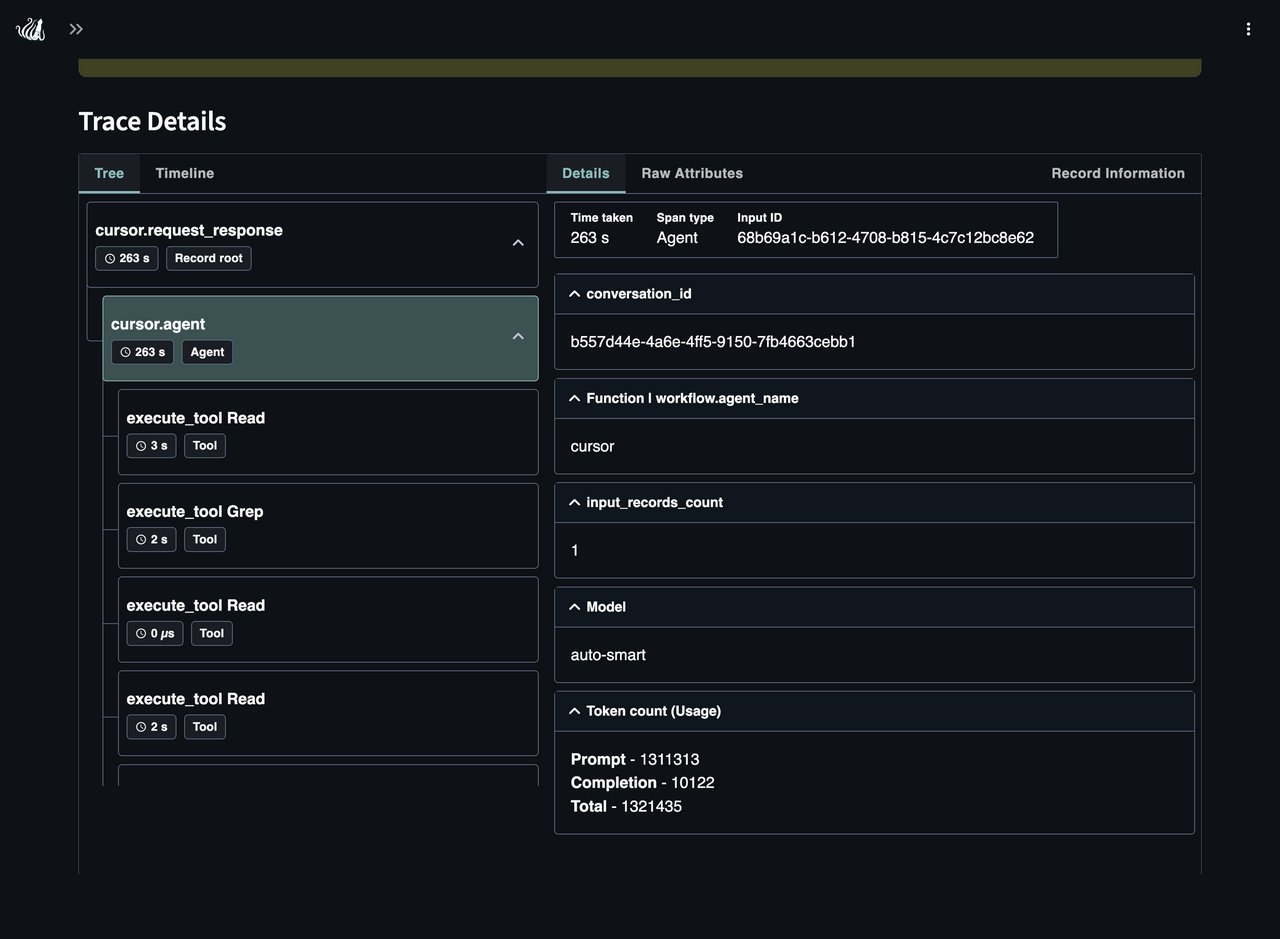
These traces use the same selectors and conventions as any other TruLens app. Model inference, token usage, and tool execution follow official OTEL GenAI conventions. Coding-agent-specific fields (client name, editor version, workspace, diffs) live under ai.observability.*.
On Snowflake, TruLens also manages AI Observability run lifecycle: each conversation becomes a run, each turn an invocation. OSS and OTLP destinations export spans only.
Evaluate the Traces
Since hook traces are standard TruLens records, you can evaluate them the same way you would any other app. Point a session at the database the worker exports to and score offline:
from trulens.core import Metric, Selector, TruSession
from trulens.providers.openai import OpenAI

session = TruSession(
    database_url="postgresql+psycopg://trulens@localhost/traces"
)
provider = OpenAI(model_engine="gpt-4o")

f_tool_selection = Metric(
    implementation=provider.tool_selection_with_cot_reasons,
    name="Tool Selection",
    selectors={"trace": Selector(trace_level=True)},
)
f_execution_efficiency = Metric(
    implementation=provider.execution_efficiency_with_cot_reasons,
    name="Execution Efficiency",
    selectors={"trace": Selector(trace_level=True)},
)
f_session_coherence = Metric(
    implementation=provider.coherence_across_turns_with_cot_reasons,
    name="Session Coherence",
).on_conversation()

events = session.get_events(app_name="cursor", app_version=None)
session.compute_feedbacks_on_events(
    events, [f_tool_selection, f_execution_efficiency, f_session_coherence]
)
Tool Selection and Execution Efficiency score each turn against its full trace. Session Coherence uses .on_conversation() to score multi-turn consistency across a coding session. CONVERSATION_ID is already set from the native session ID, so turns group into conversations automatically.
To get useful evals out of this, turn on all three content flags — TRULENS_CAPTURE_CONTENT, TRULENS_CAPTURE_TOOL_PAYLOADS, and TRULENS_CAPTURE_DIFFS — before the session runs. Each gates its own fields independently and all default to off, so Tool Selection and Execution Efficiency only see what they need — tool names, arguments, and results, not just timing — when the tool-payload flag is on. Content captured after the fact can't be reconstructed, so set these upfront on any session you intend to evaluate.
Scores land in the same leaderboard, so comparing Cursor vs. Claude Code vs. OpenCode by (app_name, app_version) works out of the box.
Crash Recovery
Hook invocations write to a locked local journal and return immediately. A detached worker exports completed turns in the background, retrying transient failures with backoff:
trulens-client-hooks status cursor
trulens-client-hooks validate
trulens-client-hooks flush   # synchronous recovery after a crash
Retried exports reuse the same record ID, input ID, and trace ID, so duplicates aren't created. Hooks fail open: telemetry errors go to stderr and never block the coding client.
Get Started
pip install trulens --upgrade
Questions or feedback? Open an issue or discussion.